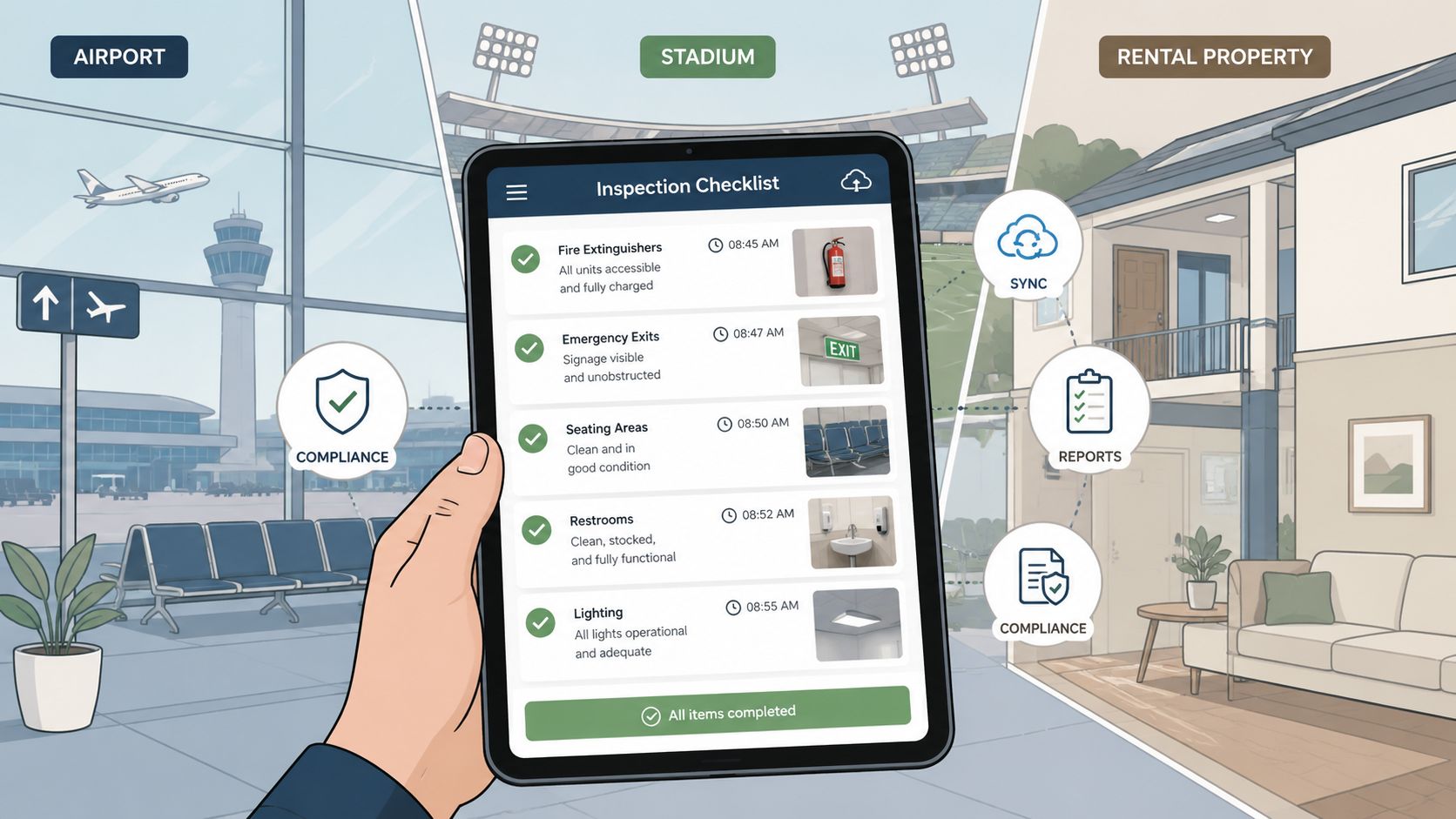
A restroom near an airport gate can look fine from the entrance and still fail the next passenger. A machine console may carry residue after a member wipes it once. A paper log may show every box checked while no one can identify who cleaned the surface, when they did it, or what happened after a missed task.
That's why a digital checklist app should be judged by operational behavior, not by the length of its feature list. In facilities I've managed across multiple sites, the useful question was always the same: does the crew complete the checklist during the shift, and does every failed item reach a named person who closes it?
Cleanliness protects public confidence, supports safer operations, and gives owners a defensible record of what happened. Disinfectant wipes add a practical layer because they let staff address high-touch equipment immediately, provided they follow the product label and keep the surface wet for the required contact time. Wipes.com is one relevant place for teams comparing wipe products and facility supply options.
Where Paper Checklists Quietly Fail at Busy Facilities
At a busy airport terminal, the sanitation supervisor finds a laminated restroom sheet clipped beside the janitorial closet. Every time slot has a mark. Several signatures are difficult to read. The night crew says they completed the route, but nobody can confirm which restrooms were serviced during the busiest boarding window. The sheet was filled in later, after the pressure eased.
That paper process creates a record, but not reliable operational evidence. A pre-filled completion time can make late documentation look timely. An illegible signature prevents accountability. A misplaced sheet removes the history entirely. Even when the form survives, it usually carries no photo, location confirmation, or direct route for a failed item.

The difference between a signed log and a clean facility
A signed checklist can satisfy a filing requirement while hiding repeat problems. If the same restroom repeatedly runs out of soap, or a cardio area receives attention only after complaints, the paper log rarely helps a manager identify the pattern. Failed observations sit on a page instead of moving to maintenance, a supervisor, or a replacement supply route.
That's compliance theater. The team performs the appearance of control, but the system doesn't prove that work happened correctly or that defects were resolved.
Operational rule: A completion mark matters only when it identifies the place, the person, the time, the evidence, and the next action.
A digital checklist app fixes the structure, not merely the format. The cleaner records the work at the point of service, attaches evidence when required, and submits a failed item into a workflow that someone owns. That shift matters in airports, gyms, schools, restaurants, and retail stores because high traffic turns small missed tasks into visible failures quickly.
The market's expansion reflects this operational shift. One industry report valued the global to-do list apps market at USD 1.02 billion in 2024 and projected USD 1.79 billion by 2030, with a projected compound annual growth rate of 9.78%, while another estimated USD 1.25 billion in 2025 and USD 2.50 billion by 2032. These figures are reported in industry coverage of task-platform marketing statistics, and they point to checklist tools becoming part of workplace coordination rather than remaining personal productivity utilities.
What a Digital Checklist App Actually Does
A useful app enforces four operating mechanics. It captures work when it happens, preserves evidence, prevents incomplete sign-off, and gives managers a shared view across locations.
Capture work where the signal disappears
Offline-first capture is essential for jet bridges, mechanical rooms, stadium suites, basements, and crowded gym floors. A cleaner should be able to open the assigned route, record each result, take a photo, and continue without waiting for a network connection. The app then queues the submission and syncs it when service returns.
Timestamped photos add context that paper cannot. For a locker room inspection, a supervisor can require an image of treated sinks, fixtures, or other high-touch surfaces. The image should attach to the precise checklist line, not sit in an unstructured phone gallery.
Required fields stop the familiar tap-through behavior. If a contact-time confirmation, location, product selection, or photo is mandatory, the app should block final submission until the worker completes it or records an approved exception.
A central dashboard then aggregates activity across sites. Managers can see overdue routes, recurring failures, and open corrective actions without collecting binders from each building.
| Mechanic | What It Captures | Frontline Outcome |
|---|---|---|
| Offline capture | Responses, notes, and evidence before automatic sync | Crews keep working in low-connectivity zones |
| Timestamped photo evidence | A visual record attached to a specific task | Supervisors can review the actual area, not just a signature |
| Required fields | Mandatory answers, photos, and exception reasons | Incomplete routes cannot pass as finished |
| Central dashboard | Site, shift, task, and failure status | Managers can prioritize work across locations |
Make failed items move immediately
If a machine is marked dirty or damaged, the app should notify the supervisor and create a corrective action with an owner, priority, and close-out record. A failed item that remains in a dashboard without assignment is still a paper form, only faster to search.
Teams replacing paper workflows may also benefit from understanding adjacent operational migrations. The expert ESP migration for founders provides useful context on planning system changes around users, dependencies, and continuity, principles that apply well beyond email platforms.
Must-Have Features by Facility Type
A vendor demo often shows the same checklist builder to every buyer. That's the wrong buying process. The feature priority should follow the facility's pressure points, the people using the system, and the evidence managers may need later.

Airports and sports venues
Airport operations need multi-language support, strong user authentication, offline capability, and audit trails that connect cleaning events to incident response. Badge or biometric authentication may suit controlled environments, but the identity method must remain practical for the actual crew. A slow login process will produce shared accounts, which destroys accountability.
Sports venues need speed and hand-off visibility. Restrooms, seating areas, concourses, and concessions can change condition rapidly during an event. The checklist should support high-volume restroom turnover, ADA-related cleaning records, and concession-area allergen controls without forcing workers through irrelevant fields.
Short-term rentals and event spaces
Short-term rental teams need a visual turnover record. A photo walkthrough at checkout and check-in can help compare condition, while turnover tracking shows whether a property is ready before the next guest arrives. For bathrooms and kitchens, include product, surface, and contact-time fields rather than a vague “cleaned” button.
Event spaces need shift hand-offs that survive overnight transformations. The system should let one crew document the teardown, another record the reset, and managers connect tasks to the event run-of-show. A checklist that cannot show ownership across hand-offs will leave the most important work between shifts.
Dealerships and fitness centers
Car dealerships should prioritize showroom-ready standards, customer-facing vehicle preparation, and service-loaner hygiene logs. A vehicle may be mechanically ready but still fail the customer's first visual impression if touchpoints, displays, or loaner interiors are neglected.
Fitness centers need a fast mobile route for locker rooms, reception counters, cardio consoles, dumbbell handles, bench pads, cable attachments, and entry points. Staff can use gym equipment cleaning wipes at point of use, while managers use the app to verify that high-touch zones receive attention throughout the operating day.
The CDC advises using disinfecting wipes on frequently touched electronics such as phones and computers, and notes that more than one wipe may be needed to keep a surface wet for the full label contact time. CDC cleaning and disinfection guidance supports training staff on the actual wiping method, not just the product name.
From Pilot to Rollout Without Creating Compliance Theater
Rollout should follow the work, not a procurement calendar. Start with one terminal, one gym floor, or one rental cluster. Keep the pilot narrow enough that supervisors can observe behavior and broad enough to expose real interruptions, supply gaps, language issues, and connectivity failures.

Pilot first, then earn the next site
Use a 30-day pilot to test the route, not to generate a polished presentation. Require workers to log time per task so managers can see whether the app slows the shift. Expand at the 90-day stage only after completion rates exceed 85% and every failed item produces a documented corrective action within four hours. Those thresholds are rollout criteria for this operating model, not universal industry benchmarks.
Training belongs on shift. Show workers how to open the route, capture a photo, record an exception, and escalate a failed surface while they're standing in the facility. Provide the quick card in both Spanish and English, especially for locker rooms, supply closets, and other places where staff need a fast reminder rather than a classroom lecture.
Quality assurance must inspect the evidence
At the 180-day stage, assign a supervisor to spot-check 10% of submitted checklists each week. Compare timestamped photos with a known-soiled control point or another deliberately selected inspection condition. Review whether the image shows the required surface, whether the surface appears treated, and whether the failed-item route resulted in a real close-out.
A completion dashboard is a data feed, not proof of cleanliness. Leaders who reward only submission rates will train crews to tap through screens. Leaders who review corrective-action closure, photo quality, repeat failures, and field feedback will build a system that changes behavior.
For a broader framework around ownership, controls, and documented follow-up, the Cleffex compliance management guide is a useful complementary resource. Facilities teams can also review real-time monitoring systems when deciding how checklist data should reach supervisors during active operations.
Sample Templates and the Metrics That Matter
A template should mirror the route workers walk. If the checklist asks for information nobody uses, workers will rush it. If it omits the evidence needed to resolve a complaint, managers will have to reconstruct the event later.
Gym daily turnaround
Start with locker rooms, then move through equipment and floors. Require photo evidence for selected high-touch surfaces such as cardio consoles, bench pads, and reception counters. The worker should record whether the area was serviced, whether product was available, whether a surface failed inspection, and who received the corrective action.
For busy gyms, operational frequency needs to match demand. Gym-cleaning guidance identifies cardio consoles, dumbbell handles, bench pads, cable attachments, entry points, and reception counters as high-touch zones, with some guidance recommending staff circuit-cleaning every 30 to 45 minutes during peak hours. That recommendation appears in gym hygiene standards guidance. Staff can use wipes for gym equipment between broader cleaning cycles, but the label must govern surface compatibility and contact time.
Short-term rental turnover
The rental template should separate bathrooms, kitchens, and linens. Include a photo after the bathroom reset, a photo of kitchen touchpoints, a linen change confirmation, and an exception field for damage or missing supplies. The manager should be able to compare checkout and check-in evidence without relying on memory.
Do not confuse a recorded task with a disinfected surface. EPA label directions for one disinfectant wipe require hard, non-porous surfaces to remain visibly wet for 1 minute, with enough wipes used to maintain that condition. The EPA disinfectant wipe label should be the controlling reference for product-specific instructions.
Airport gate-area nightly reset
The airport template should cover the gate area, jet bridge, seating, trash handling, and supply replenishment. A failed spill, damaged seat, or overflowing bin needs a named owner and a close-out time, not merely a comment field.
Track these measures:
- Integrity-weighted completion: Count required photos, timestamps, exception reasons, and location data, not just submitted forms.
- Corrective-action response: Measure the mean time from a flagged failure to documented resolution.
- Photo-evidence match: Compare submitted images with supervisor spot-checks to test whether the image proves the requested task.
- Surface verification: Use ATP swab pass results where the facility has an appropriate testing program.
- Complaint density: Track guest or passenger complaints per 1,000 cleanings as an operational indicator, without treating it as a standalone cleanliness score.
A checklist can show that crews completed a route while the facility still performs poorly. Use commercial cleaning checklist templates as a starting point, then add the evidence and escalation fields your environment requires.
| Facility Type | Required Photo Evidence | Contact Time | Failure Metric |
|---|---|---|---|
| Gym daily turnaround | High-touch equipment and locker-room surfaces | Product-label requirement | Repeat equipment failures and corrective-action time |
| Short-term rental turnover | Bathroom, kitchen, and condition comparison images | Product-label requirement | Missed turnover defects and guest complaint density |
| Airport gate reset | Seating, jet bridge, and trash area | Product-label requirement | Open failures at next shift hand-off |
One caution matters across all three templates. Specific contact times must come from the product label. The operational examples of 60 seconds for quat-based disinfectants on hard surfaces and 3 minutes for sporicidal agents should only be configured when the selected product label states those times.
Choosing a Vendor That Survives Frontline Reality
Most vendor demos look efficient because the vendor controls the environment. The screen is clean, the route is short, the user is trained, and every failed item already has an answer. Your facility is louder, less predictable, and full of staff who may share devices, move between zones, or work with unreliable connectivity.
Demand a 14-day pilot with your actual cleaners before signing. Measure how many shifts require supervisor intervention, how often workers abandon a route, and whether staff can complete the checklist without pausing production. A polished administrator dashboard means little if the frontline workflow feels slower than the paper sheet.
The vendor questions I'd ask
- Offline capture: Can staff finish a jet-bridge or stadium-suite route without signal and sync automatically later?
- Failure ownership: Does a failed item route to a named person with a four-hour SLA, or disappear into a generic inbox?
- Language support: Can managers publish multilingual checklists and train workers in the languages they use?
- Evidence quality: Can the app identify which restroom was cleaned, by whom, and at what time before anyone discusses AI photo recognition?
- Customer references: Can the vendor provide references from airports, gyms, venues, rentals, or dealerships with similar operating pressures?
- Pricing structure: Is pricing based on active sites rather than seats, so you aren't paying for cleaners who never log in?
More digitalization doesn't automatically produce better cleanliness. A complicated app can increase skipped fields, encourage shared logins, and bury urgent failures under analytics. I'd choose a smaller system that crews complete consistently over a sprawling platform that promises predictive intelligence but can't route a dirty restroom to its owner.
For facilities teams, offline capture, timestamped records, photo evidence, required fields, scheduling, role-based access, exportable reports, and corrective-action workflows are the practical differentiators. Industry documentation describes this combination as a way to support guided inspections, central visibility, remediation, and audit traceability across multi-site operations, as outlined in this digital inspection workflow reference.
Your First 30 Days With a Digital Checklist App
Start tomorrow with two current paper routes. In week one, map them and mark every point where a failed task loses ownership. In week two, configure required photos, timestamp controls, user roles, and escalation triggers.
In week three, launch one shift or zone with three frontline workers. Compare completion quality with failure handling, not submission volume. In week four, add a second shift, review the corrective-action log, and decide whether the route is ready for a phased rollout.
Use practical onboarding principles from onboarding checklists for sales teams, especially clear ownership, visible milestones, and follow-up after training.

Before procurement, answer one question: does every failed item have a named responder and a documented close-out time? If the answer is no, no app will solve the cleanliness problem.
Clean high-touch surfaces deliberately, keep disinfectant wipes visibly wet for the product's stated contact time, and build those actions into every shift route. Facility owners, janitorial leaders, gym operators, and cleaning-supply sales teams should pilot a digital checklist app alongside the right disinfecting wipes, then make corrective-action ownership part of the daily routine.
Leave a Reply